Introducing ci-score: an AI coding agent skill that grades your GitHub Actions setup

Today we're releasing ci-score, a free and open-source agent skill that grades your GitHub Actions configuration against a published rubric of best practices and hands your coding agent a ranked fix for every gap it finds. It works with all 73 coding agents currently supported by Vercel's Skills CLI, including OpenCode, Claude Code, Codex, and Cursor.
Point it at a local checkout and it reads your workflow files, checks eleven configuration facts, and writes a report with your score, the evidence behind every check, and a copyable prompt for each fix. It runs entirely on your machine. No network calls, no telemetry, nothing sent to StarSling.
It works in four steps:
- Reads your workflows. It opens the Actions workflow files in a clean checkout and extracts the configuration facts the rubric asks about. No API calls, no credentials, no run history required.
- Checks eleven practices. Each one is pass, fail, or not applicable, across caching, checkout depth, build reuse, parallelism, trigger scope, gate hygiene, and the two security practices in scope. The full list is below.
- Scores what applies. Your score is passed checks over applicable checks, rounded. A check that cannot apply to your repo leaves the denominator rather than counting against you.
- Ranks the fixes. Every failed check ends in a ready-to-paste prompt carrying the fact that failed, where in your YAML it failed, and what to change. Your agent writes the diff for you to review.
You review the diff. Nothing merges that you did not approve.
Every check is a configuration fact: a thing that is present or absent in your own files. There is no LLM in the scoring path, and no measured magnitude gates a score. That constraint is deliberate, and we got it wrong first. An earlier rubric deducted points based on measured thresholds, which produced wrongful deductions faster than review could remove them, and a score a maintainer cannot debug fails both of us. So the rule now is that you must be able to verify any check against your own YAML in under a minute.
The same principle governs what happens when the rubric does not apply. Rather than publish a confident-looking number from thin evidence, ci-score refuses to score at all in three cases: when a repo has no workflow files, when a scan predates the current rubric, and when the visible workflows are only automation. That last one exists because a repository whose workflows are all release and triage bots once scored a perfectly real-looking number off machinery that was never its CI.
Several have a full guide on this site explaining the fix, with good and bad YAML side by side:
- Cache dependencies in GitHub Actions
- Set actions/checkout fetch-depth: 0 vs 1 vs 2
- Shard tests across parallel jobs
- Build and test only what changed
- Cut CI queue time
- Cancel superseded runs
- Filter workflows with paths and paths-ignore
- Scope id-token: write
- Pin GitHub Actions to a commit SHA
The methodology page publishes all eleven with the exact fact each one asks about, the formula, and the cases where the skill refuses to score at all.
It is not a speed measurement, and it does not predict how fast your CI runs. A repo can follow every practice here and still be slow because one test suite is enormous, and a repo can score badly and still merge quickly. Configuration adherence and wall-clock time are different questions, which is why they are different tools: if wall-clock time is your question, ci-speedup answers it by sampling your real runs.
We ran ci-score against a set of well-known open-source repositories and published every result, including the ones that are not flattering:
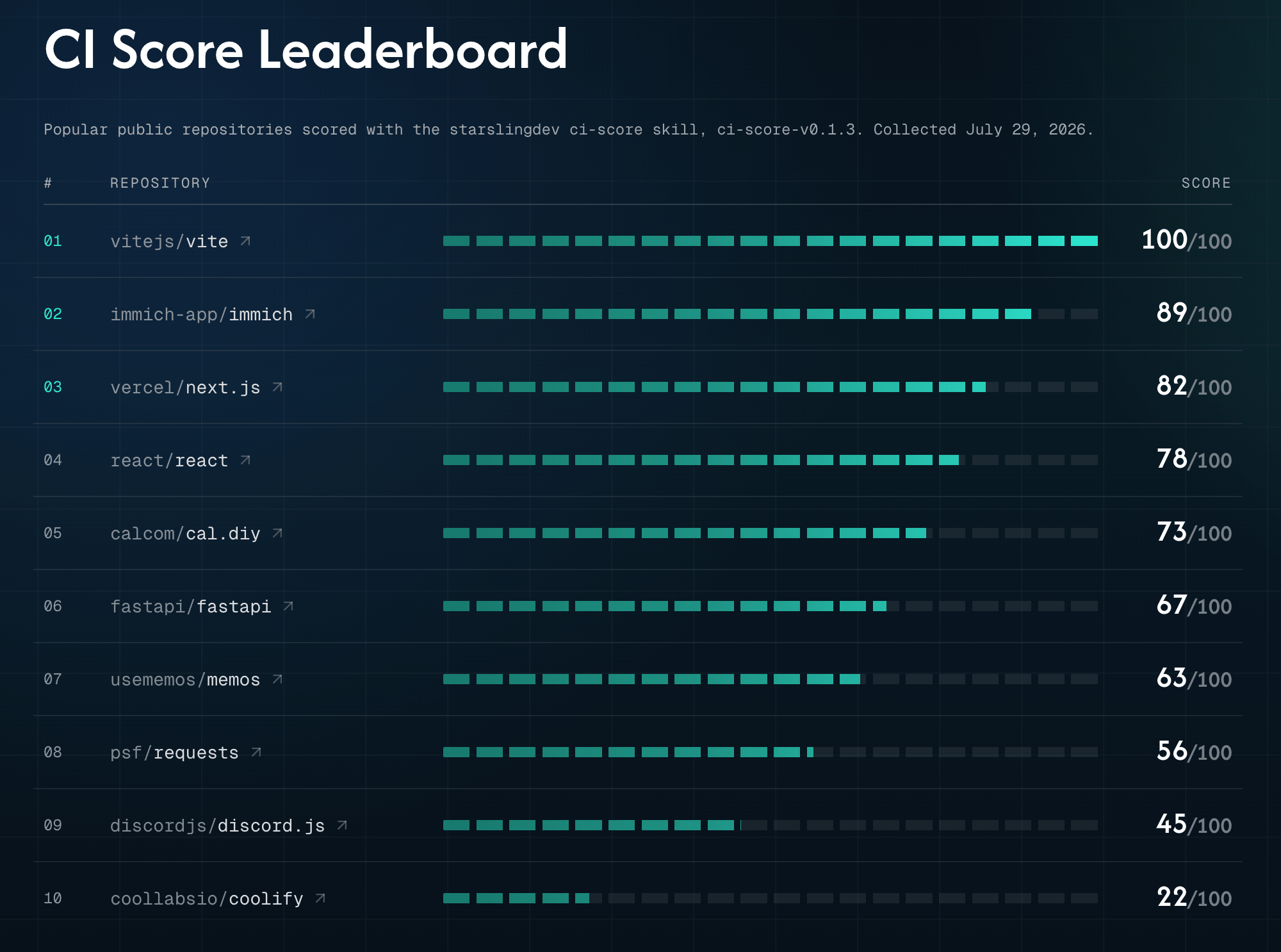
Every one of those numbers is committed to this site as data and re-derived in our CI from the same scorer the skill runs, so the board cannot drift from what the tool would tell you. See the full leaderboard.
Install the skill and run it in any repo:
npx skills add starslingdev/skillsThen invoke /ci-score in your agent. Prefer not to install it? Paste this into your coding agent instead and it will fetch and run the skill for you:
Run `npx skills use "https://github.com/starslingdev/skills" --skill "ci-score"` and follow the generated skill instructions now.It writes ci-score-report.md in your repo and nothing else. It is open source under the MIT license. Read the skill in the repo, or see how it scores on the ci-score page.
The skill is you checking the configuration once, with your own agent. Configuration drifts, though: a new workflow lands without a cache, a checkout quietly goes back to full history, an action gets pinned to a moving tag. On paid plans, once optimization PRs are enabled, StarSling Runners keep these practices in place as your workflows change, and open every fix as a PR your team reviews and merges.
If your team runs CI on GitHub Actions, install the StarSling GitHub App to keep it in shape automatically.
Happy Slinging 💫
Yonas